HDfuryBuyQuick start
HDfuryORIGINAL SIGNAL INTELLIGENCE

EDID CONTROL · HDMI 1.4a · HANDSHAKE FIX

DR HDMI:
take control of your HDMI handshake.

The original HDfury Dr HDMI is an HDMI 1.4a EDID manager, emulator and repeater for handshake and compatibility problems. It places a fixed, controllable EDID point between source and display and supports 2K, WUXGA and 1080p60.

8EDID BANKS5 preset · 2 custom · 1 sink
225MHzVIDEO CLOCKSingle-link HDMI
2.25GbpsBANDWIDTHHDMI 1.4a platform
2KVIDEO SUPPORTWUXGA · 1080p60
HPD RESET HDCP PASS-THROUGH CEC PASS-THROUGH SINK EDID COPY
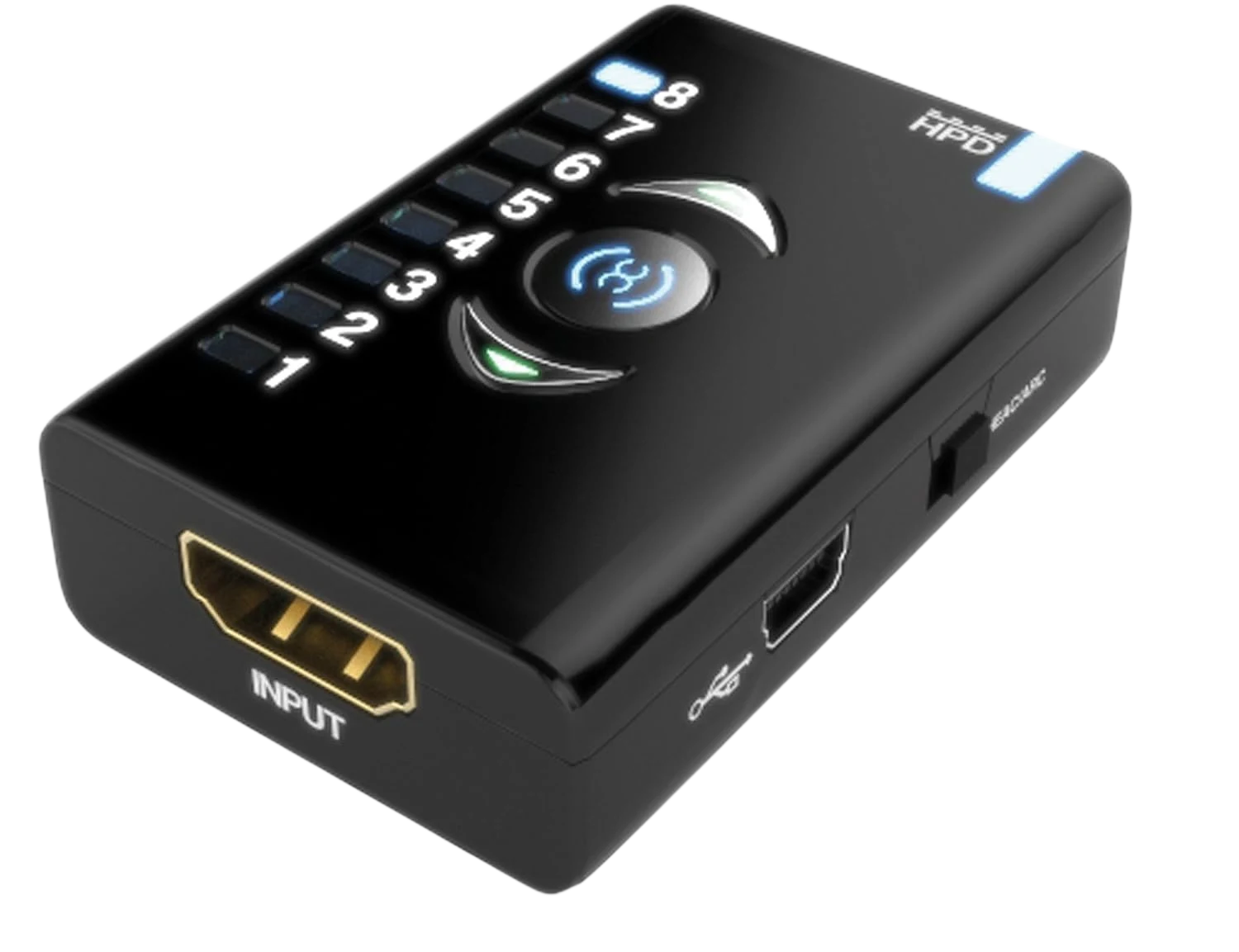
Original HDfury Dr HDMI EDID manager with EDID bank 8 lit SIGNAL CONTROL ONLINE

DR HDMI EXPLAINED

What is Dr HDMI?

Dr HDMI is HDfury's original HDMI 1.4a EDID manager. It sits between an HDMI source and the rest of the video chain. The source then reads the EDID selected on the Dr HDMI, so resolution and capability information stays predictable when a TV, monitor, projector, AV receiver, splitter or extender changes or is temporarily switched off.

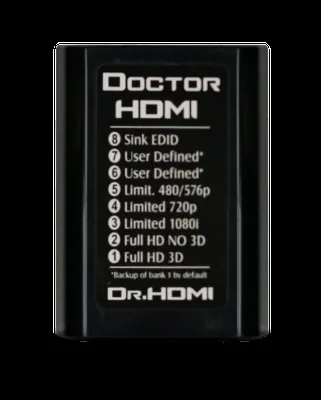
The unit has 8 EDID banks: five fixed presets, two programmable user banks and one bank for a copy of the connected display's EDID. After a bank is activated, the Dr HDMI generates an HPD event so the source reads the new information again.

8EDID banks
225 MHzsingle-link video
2KWUXGA · 1080p60 · 12-bit
50 m*cable loss compensation

HOW DR HDMI WORKS

A small adapter that takes control of the HDMI conversation.

HDMI carries more than picture and sound. Before any picture appears, devices exchange information. Dr HDMI steps in at exactly that negotiation stage.

01 / EDID

What is EDID?

EDID is the list of capabilities a TV, monitor, projector or receiver reports to the source: supported resolutions, timings and audio formats, among other things. If that information is missing, changes or is passed on incorrectly, a source may output no picture or pick an unsuitable mode.

02 / HPD

What is Hot Plug Detect?

HPD is the signal HDMI equipment uses to indicate that a connection or capability status has changed. After an EDID bank change, the Dr HDMI generates a new HPD event so the source reads the selected EDID again and reconfigures itself.

03 / EMULATION

What does Dr HDMI do in between?

The source reads the EDID presented by the Dr HDMI instead of depending entirely on the changing chain behind it. That lets you use a fixed preset, program your own EDID or copy the display's EDID to bank 8.

HDMI NEGOTIATION // CONTROL PATHLIVE
1SOURCEPC · console · player
2DR HDMIhold / adjust EDID
3DISPLAY CHAINAVR · splitter · projector · TV

TROUBLESHOOTING BY SYMPTOM

What is your HDMI chain doing?

Pick what you see. Dr HDMI is most useful when EDID or Hot Plug Detect makes the negotiation between devices unstable.

NO SIGNAL

Give the source a known EDID.

Start with a fixed preset such as 720p or 1080i. If that gives you a picture, you have quickly established that capability negotiation plays a role. Then work up to the profile you actually want.

01SOURCE
02 · EDIDDR HDMIHPD READY
03DISPLAY / AVR

WHAT THE DEVICE DOES

A fixed checkpoint
in your HDMI chain.

01 / EDID

EDID manager & emulator

Shows the source a preselected EDID, even when the actual display chain changes.

02 / HOT PLUG

On-the-fly HPD reset

After a bank change, the Dr HDMI triggers a Hot Plug Detect event so the source reconfigures.

03 / COPY

Sink EDID to bank 8

Press the middle button to read, store and activate the EDID of the connected display.

04 / CUSTOM

Two user banks

Fill banks 6 and 7 with your own EDID via Mini-USB and the PC software.

05 / REPEATER

Signal support

Input equalization and cable loss compensation help with longer or critical HDMI connections.

06 / PASS-THROUGH

HDCP, CEC & audio

HDCP handshakes, CEC and Lip Sync are passed through; Dolby TrueHD and DTS-HD MA are supported.

WHY EDID CONTROL

Same equipment.
Less guesswork.

WITHOUT EDID CONTROL

The source reacts to everything that changes.

Display off, receiver in standby or splitter swapped? The source may re-detect, lose sync or choose a different video format.

  • Capabilities can disappear temporarily
  • Lots of power cycling and cable swapping
  • Hard to tell whether EDID is the cause
WITH DR HDMI

The source gets a fixed agreement.

Pick a known EDID, then change one variable at a time. That makes troubleshooting reproducible.

  • Fixed or copied EDID
  • Deliberately limit the resolution
  • HPD reset after every change

DR HDMI // FROM EVERY ANGLE

See exactly what you connect.
No port left unclear.

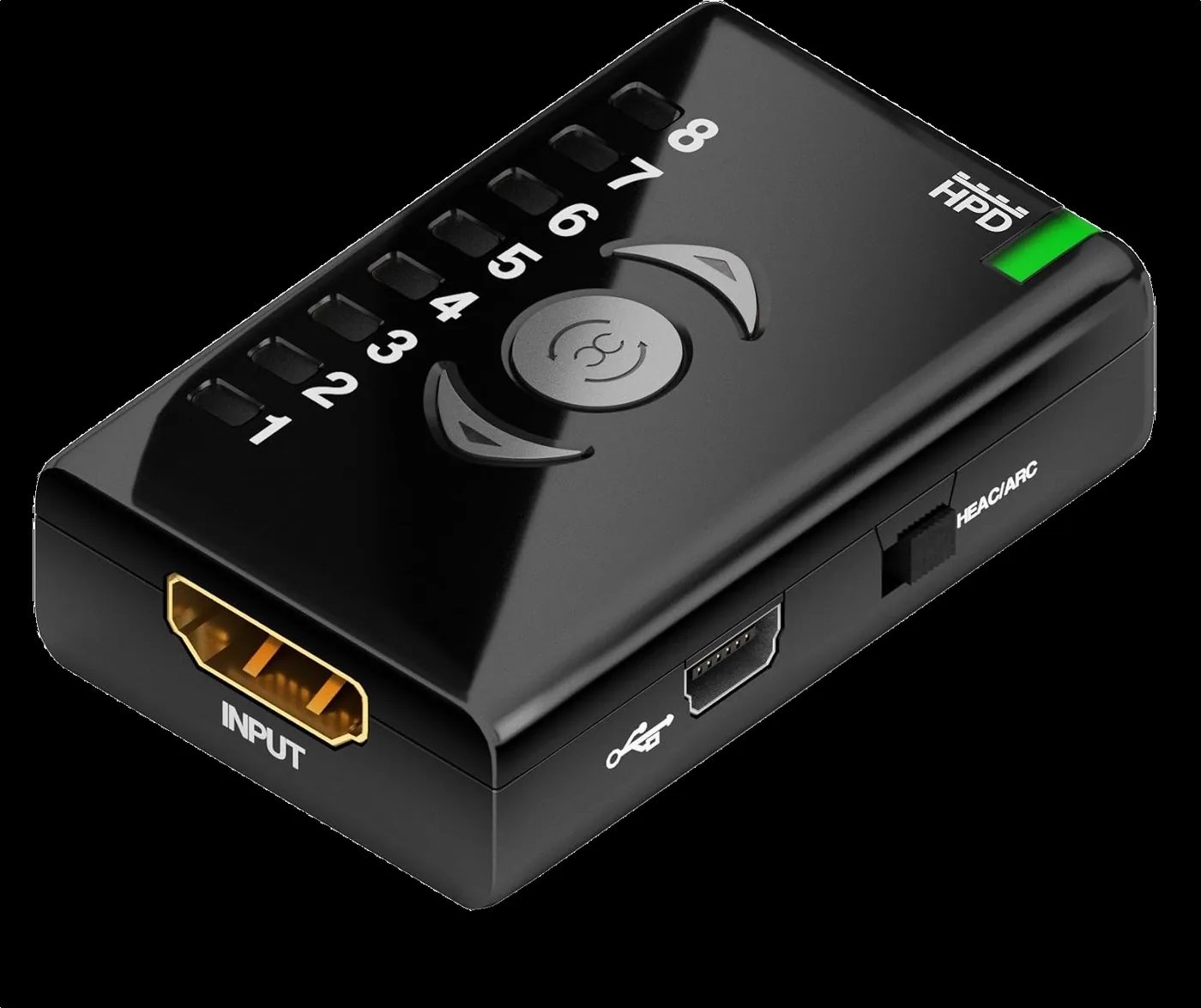
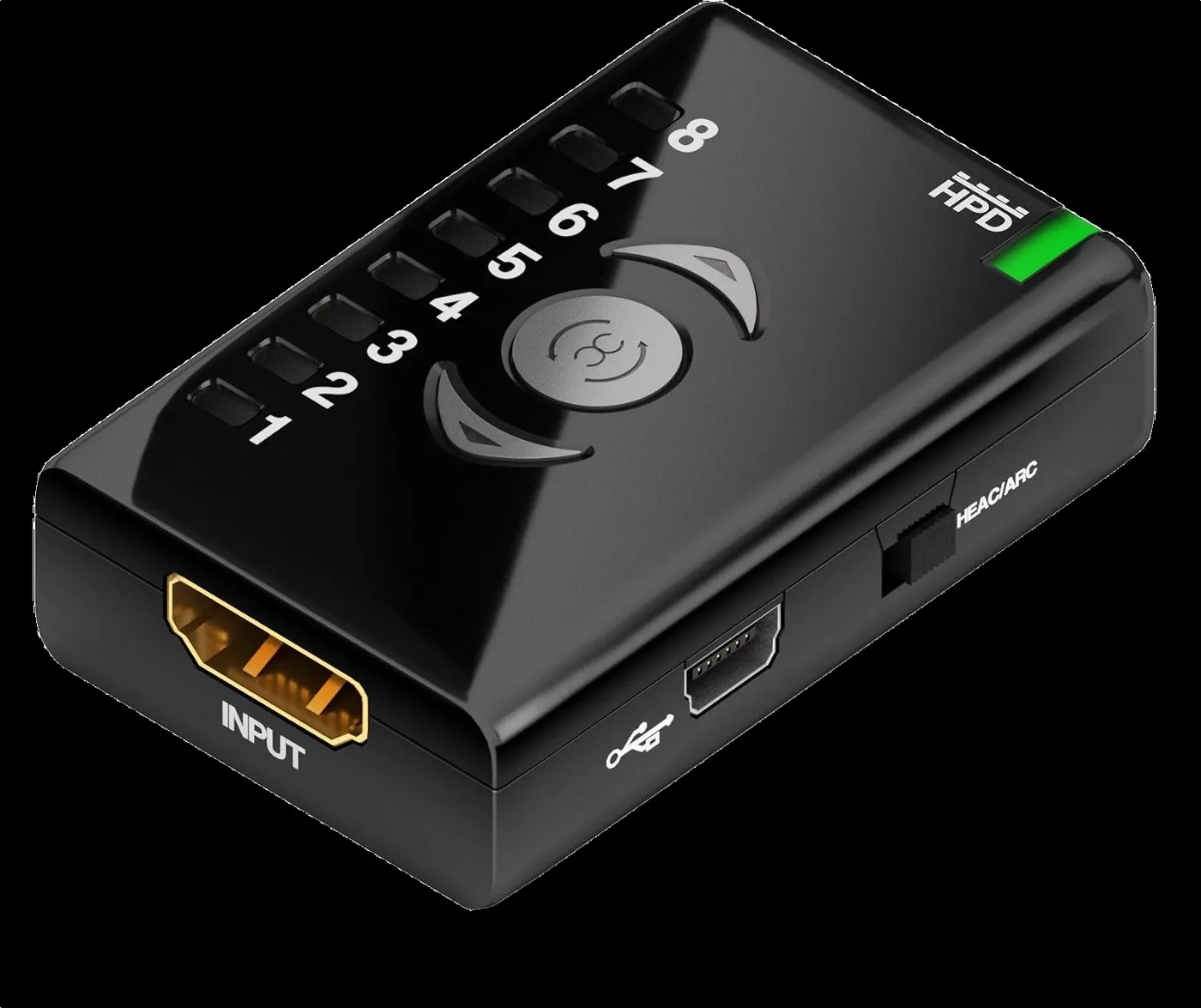
The Dr HDMI is small, but every connection has a clear function. These product shots show at a glance where the source, the display, USB and the HEAC/ARC switch go.

Dr HDMI seen from the HDMI input and the USB side
01 // INPUT SIDEHDMI source to INPUT · Mini-USB for power, firmware and EDID programming.
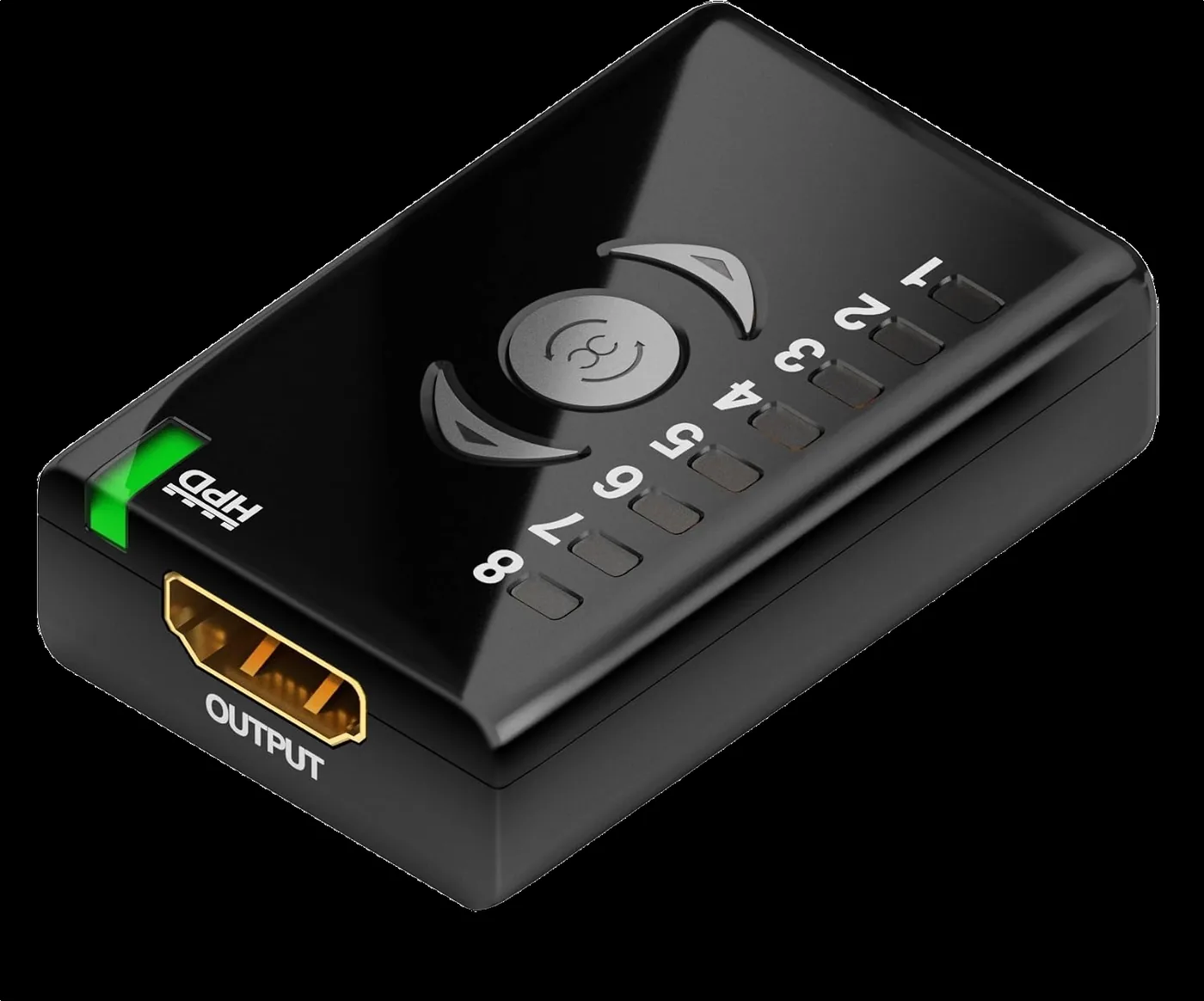
Dr HDMI with HDMI output and EDID bank indicators
02 // OUTPUTOUTPUT goes to the TV, projector, AVR or next HDMI link.
Back of the Dr HDMI with bank overview and Mini-USB port
03 // BANK MAPThe housing shows the function of banks 1 to 8 right on the device.
Back of the Dr HDMI with the legend for EDID banks 1 to 8
04 // EDID PRESETSFixed presets, two user banks and bank 8 for the display's EDID.
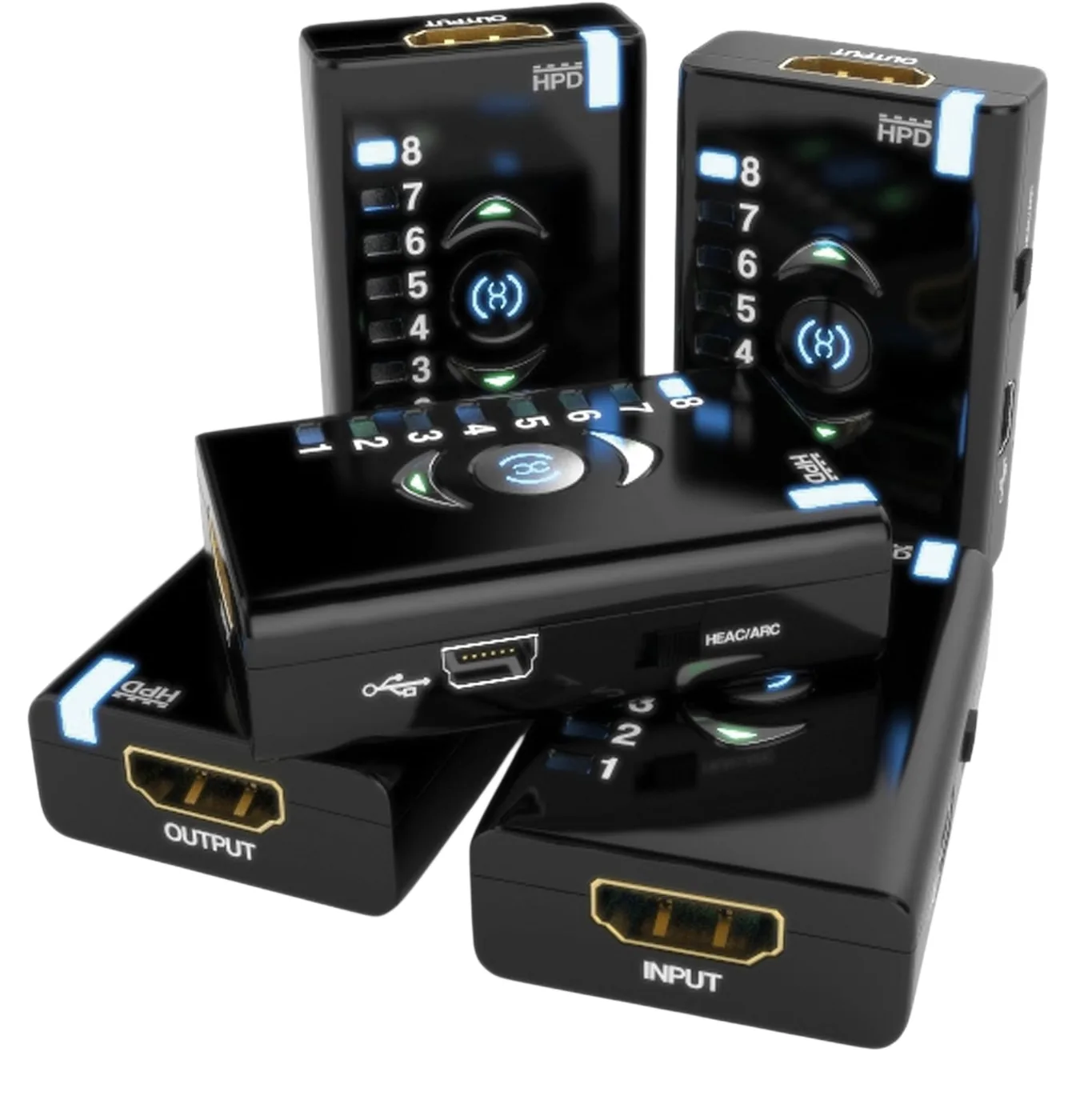
Five Dr HDMI units from different angles, showing INPUT, OUTPUT, USB and the HEAC/ARC switch
05 // COMPACT SIGNAL TOOL60 × 40 × 20 mm · designed to stay permanently between source and display.

HARDWARE TOUR

Follow the signal
from input to output.

Dr HDMI input side with HDMI input and Mini-USB port

GETTING STARTED · STEP BY STEP

How to use Dr HDMI.

For most problems you don't need the PC software. Start simple: place the Dr HDMI between the source and the HDMI chain, choose a known bank and test systematically.

01

Place it inline

Source → Dr HDMI INPUT. OUTPUT → display, AVR or next link in the chain.

02

Choose 1–8

Use ▲ and ▼. As soon as you stop for about a second, the selected EDID becomes active.

03

Wait for HPD

The Dr HDMI tells the source that the EDID has changed. This HPD event takes about two seconds; you cannot change banks during that time.

04

Or copy your display

Press the middle button. The display EDID is copied to bank 8 and activated immediately.

WHICH BANK SHOULD I CHOOSE?

Don't pick at random. Test from safe to specific.

NO PICTURE?

Start with bank 4: 720p

If this gives you a picture, the basic connection works. Then try bank 3, followed by bank 2 or 1. That shows you at which capability level the chain breaks down.

LOCK IN YOUR OWN DISPLAY?

Copy to bank 8

Switch on the display you want and make sure the whole chain is active. Then press the middle button. The Dr HDMI reads the sink EDID, stores it in bank 8 and activates it.

FIXED INSTALLATION?

Use bank 6 or 7

For integrators or specific PC/AV installations you can program your own EDID into bank 6 or 7 via Mini-USB. That lets you define exactly which capabilities the source always sees.

Dr HDMI mainly helps with

Handshake/EDID problems · picture that disappears after standby · PCs that keep re-detecting displays · AVR/projector chains · splitters/extenders · limiting the resolution · legacy Full HD HDMI.

Dr HDMI does not fix

A faulty HDMI port · a physically broken cable · missing bandwidth for modern HDMI 2.0/2.1 modes · 4K120/VRR/8K features that this original HDMI 1.4a version does not support.

8 EDID BANKS

Five presets. Two custom.
One straight from your display.

Click a bank to see what the Dr HDMI presents to the source.

ACTIVE EDID BANK1
FULL + 3DFULL CAPABILITY PROFILE

Full capabilities with all 3D features enabled.

HPD / ACTIVE
1FULL + 3D

Full capabilities, all 3D features.

2FULL · NO 3D

Full profile without 3D features.

31080i LIMIT

Limited to 1080i, no 3D.

4720p LIMIT

Limited to 720p, no 3D.

5480/576p

Lower video resolution, no 3D.

6USER DEFINED

Programmable via PC software.

7USER DEFINED

Programmable via PC software.

8SINK EDID

EDID of the connected display; copy it with the middle button.

PRACTICAL APPLICATIONS

Where the original Dr HDMI
adds the most value.

PC / HTPC

Keep the HDMI output active

Useful when a PC changes its display configuration as soon as a receiver, switch or display drops out.

PROJECTOR

Slow or difficult sync

A fixed EDID helps you test whether a source → AVR → projector chain is failing on capability negotiation.

AV DISTRIBUTION

Splitter & extender chains

Prevent different displays from constantly showing the source a different set of capabilities.

LEGACY HDMI

Limit the resolution

Push a source towards 1080i, 720p or 480/576p when older equipment cannot handle higher modes.

Not to be confused with Dr HDMI 4K or Dr HDMI 8K. This is the original HDMI 1.4a version. It is meant for legacy/Full HD chains, not for HDMI 2.0/2.1 features such as 4K120, VRR or modern HDR formats. See the differences between the three models →

WHICH MODEL DO YOU NEED?

Newer is not always better.
Choose what your chain needs.

The original Dr HDMI, the Dr HDMI 4K and the Dr HDMI 8K solve the same kind of problem: the EDID and the handshake between source and display. The difference lies in bandwidth and a few extra features. If everything in your chain stays within 1080p or 2K, a newer model adds nothing.

UP TO 1080p · 2K

The original Dr HDMI is enough

Full HD TVs and projectors, 1080p distribution, 3D in Full HD, older equipment or a source you want to limit. Within those limits this model does exactly the same job as the newer ones, and it is the smallest and most affordable of the three.

4K60 · HDR · DOLBY VISION

Then the Dr HDMI 4K is better

HDMI 2.0b up to 18 Gbps: 4K60 with HDR10, HDR10+, HLG, Dolby Vision and LLDV, 40 EDID banks with full audio, 5.1 or stereo, an HTPC mode, a +5V injector and RS232. All about the Dr HDMI 4K ↗

4K120 · VRR · 8K

Then you need the Dr HDMI 8K

HDMI 2.1 up to 48 Gbps: 4K120 with VRR and ALLM for consoles and gaming PCs, 8K60, 100 EDID tables and an OLED display plus web server to see what source and display agree on. All about the Dr HDMI 8K ↗

Which model fits your problem?

No picture, wrong resolution or problems after standby in a Full HD chainOriginal Dr HDMI
Limiting a source to 1080i, 720p or 480/576p for older equipmentOriginal Dr HDMI
A 4K source with HDR or Dolby Vision through an AV receiver, splitter or long cableDr HDMI 4K
Dolby Vision as LLDV to a display without Dolby VisionDr HDMI 4K (conditions apply, see drhdmi4k.com)
Choosing full audio, 5.1 or stereo per EDIDDr HDMI 4K
An active or fibre HDMI cable that needs extra powerDr HDMI 4K (+5V injector)
A PC or media player that must not lose its display, also in 4KDr HDMI 4K (HTPC mode)
Switching EDID banks remotely from a control systemDr HDMI 4K (RS232) or Dr HDMI 8K (IP)
PS5, Xbox Series or gaming PC at 4K120 with VRR and ALLM, or 8KDr HDMI 8K
Seeing exactly which EDID and which signal are coming inDr HDMI 8K (OLED and web server)

Not sure? First check the highest format your chain has to carry. Only when that goes above 1080p60, or when you really need one of the features above, is a newer model worth it. Otherwise the original Dr HDMI is the logical choice. See the full comparison →

SPECIFICATIONS

Hardware and signal data.

HDMIHDMI 1.4a · HDMI female input and output
EDID8 banks · 5 fixed · 2 user programmable · 1 sink copy
Video bandwidth2.25 Gbps · single-link 225 MHz
Video2K · WUXGA 1920×1200 · 1080p60 · 12-bit Deep Color · x.v.Color
AudioDolby TrueHD · DTS-HD Master Audio
EDID formatExtended EDID CEA861 · 256 bytes
Pass-throughHDCP · CEC · Lip Sync
SignalInput cable equalization · up to 50 m cable loss compensation* · extends the +5V signal through the HDMI/DVI-D chain
Controls▲ / ▼ bank selection · middle button sink copy · HPD event
USBMini-USB-B (female) · power · firmware · user EDID
PowerVia HDMI or a USB power adapter
ComplianceHDCP · FCC · CE
Dimensions60 × 40 × 20 mm (W × D × H) · 50 g
In the boxDr HDMI · USB to Mini-USB cable (6 ft)
Where to buyOfficial HDfury shop ↗ · current price and delivery time in the shop

*The practical distance depends on resolution, cable quality and the complete chain. Specifications according to HDfury's official data.

FAQ

Frequently asked questions.

Does Dr HDMI fix every HDMI problem?

No. It is mainly a tool for EDID, Hot Plug, compatibility and certain signal problems. A faulty cable, insufficient bandwidth or a defective HDMI port will not be magically repaired.

How do I switch between banks?

Press ▲ or ▼ and stop at the bank you want. After about one second that EDID is activated and the HPD event starts. It takes about two seconds; you cannot change the EDID during that time.

What does bank 8 do?

The middle button reads the EDID of the connected display, stores it in bank 8 and activates bank 8.

When do I use bank 6 or 7?

When you want to load or edit your own EDID with the PC software. That is useful for installations where you want to define exactly which capabilities the source sees.

Does it always need USB power?

No. The Dr HDMI also works without a separate power supply and then draws power from the HDMI connection; what it can pass on depends on that connection (usually 50–500 mA according to HDfury). With a USB power supply connected, it supplies as much as that power supply can deliver.

Is this suitable for 4K120 or 8K?

No. This is the original HDMI 1.4a Dr HDMI, with a maximum of 225 MHz (2.25 Gbps). For 4K60 with HDR up to 18 Gbps there is the Dr HDMI 4K; for HDMI 2.1 with 4K120, VRR and 8K there is the Dr HDMI 8K.

What is the difference between the Dr HDMI, Dr HDMI 4K and Dr HDMI 8K?

All three are HDfury EDID managers, but for different HDMI generations: HDMI 1.4a (225 MHz), HDMI 2.0b (18 Gbps) and HDMI 2.1 (48 Gbps). If your chain stays within 1080p, the original Dr HDMI is enough. See the comparison → More about the newer models is on drhdmi4k.com and drhdmi8k.com.

Does Dr HDMI work with DVI-D?

Yes. HDfury describes the Dr HDMI as an HDMI/DVI-D emulator and repeater, and it can extend the +5V signal through an HDMI/DVI-D chain. For a DVI connector you need a passive HDMI-to-DVI adapter or cable.

DR HDMI KNOWLEDGE BASE

From quick fix to in-depth diagnosis.

Need more detail? Use the in-depth pages on installation, troubleshooting, applications, downloads and HDMI/EDID terminology.

Several original Dr HDMI units with lit EDID bank indicators

DR HDMI · ORIGINAL

Stop swapping cables at random.
Make the handshake predictable.